
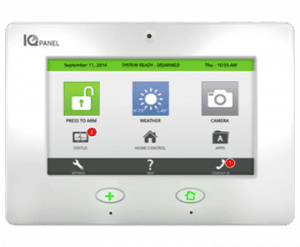
Q: What do I press to wake up my panel?
The panel will go in to conservation mode to conserve energy. To wake the panel, gently tap the touch screen or press the Home button.
How do I arm my alarm system?
Tap the green “Press to Arm” icon on main screen
- Away mode: Tap the red “Arm Away” icon
- Stay mode: Tap the yellow “Arm Stay” icon
Q: How do I disarm or silence an active alarm?
Tap the red “Press to Disarm” icon on main screen
- Enter your 4-digit user code
Q: How do I edit the volume, chimes, voice settings, etc., for my alarm?
- Using the IQ Panel:
- Navigate to the Sound Icon through the Apps Folder on the main screen, or tap on Settings and select System Settings to manage and customize your panel’s volume, chimes, etc.
- Using the Alarm.com Mobile App:
- Select the Menu button
- Now choose Security System
- Select the Gear Icon in the upper right
- Now choose Sound Settings
- Now choose the Sound Options you prefer
Managing your smart home has never been easier! Below is a helpful video with how-to instructions on managing your System Volume and Chime Settings from the Alarm.com Mobile App.
Q: How do I run a system test on my alarm panel?
Press “Settings”, enter your 4-digit passcode, and select “System Tests”.
Q: How do I connect my alarm panel to Wi-Fi?
From the home screen, press “Settings”. Enter your 4-digit passcode and then select “System Settings.” Tap on “Wireless Settings” to view your current network or connect to new ones.
Q: How do I test the Wi-Fi connection on my alarm panel?
Press “Settings,” enter your 4-digit passcode, and select “System Tests”. Select “Wi-Fi Test” to test and ensure a strong Wi-Fi connection.
Q: How do I view the weather on my alarm panel?
The second icon on the home screen is for weather. When you tap the weather icon, you will get a four day weather forecast.
Q: How do I view messages on my alarm panel?
Tap on the folder icon on the home screen labeled “Apps” then tap on “Alerts” to see what the panel may be experiencing.
Q: How do I bypass zones?
When arming the system, bypass zones easily by checking the buttons next to the sensor name on the right side of the screen. Tap on the green “Press to Arm” icon and the status and bypass option for each zone will show on the list.
Q: How do I watch video tutorials on my alarm panel?
The second icon in the footer of the home screen is “Help”. To watch a video, select the Video Tutorials tab and press “Play”.