
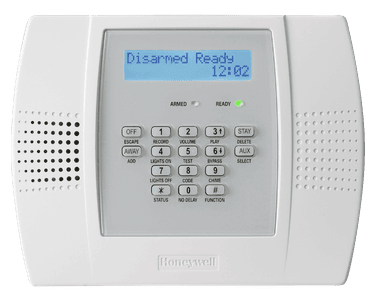
Honeywell Lynx Plus Panel
Q: How do I arm my alarm system?
To arm your alarm system:
- AWAY mode: Enter in 4-digit code and then press AWAY
- STAY mode: Enter in 4-digit code and then press STAY
If the doors are not opened after putting in your code to set alarm, the system will assume you are home and arm in STAY mode automatically.
- STAY mode arms all door/window sensors with no entry delays and omits motion detectors
- AWAY mode arms all sensors and entry/exit doors will have an entry delay once triggered
Q: How do I disarm or silence an active alarm?
- Enter your 4-digit code
- Press OFF
Q: How do I clear an alarm or fault from my alarm panel screen?
- Enter your 4-digit code
- Press OFF
Q: How do I check the status of my alarm system?
Press * * and the system will audibly communicate information
Q: How do I enable/disable the chime feature?
- Press #
- Press 9
Q: How do I adjust my keypad volume?
- Press # (Function)
- Press #2 (volume)
- Press #3 for UP or #6 for DOWN
Q: How do I reset the time and date on my alarm panel?
- Enter your 4-digit code
- Press # 6 3
- Follow the voice prompts
- Enter hour (2 digits), then press Away to accept
- Enter 0 for AM or 1 for PM, then press Away
- Enter minutes (2 digits), press Away
- Enter month (2 digits), press Away
- Enter day (2 digits), press Away
- Enter year (2 digits), press Away to finish
During programming, you can press # at any time to have the system repeat the voice prompts if you get lost.
Q: How do I bypass zones?
- Enter your 4-digit code
- Press BYPASS (6)
- Enter 2-digit zone number
Bypass will be erased when the alarm is disarmed. Bypassing zones must be set prior to arming the system. Fire zones cannot be bypassed.
Q: How do I change/edit Passcodes?
Changing the Primary/Master Passcodes
- Enter your current 4-digit master code
- Press 8 0 2
- Enter the new 4-digit code twice
- The system should beep 3 times to indicate the change
Be sure to test the OLD code to make sure that it no longer works and then test the new to confirm that it is working.
Programming Secondary Codes
- Enter your 4-digit master code
- Enter the secondary code ID ranging from 803-864
- Enter the new 4-digit code
- The system should beep once to indicate the change
Deleting Secondary Codes
- Enter your 4-digit master code
- Enter the secondary code ID ranging from 803-864
- Press #0
- After 3 secs the keypad should beep once indicating the code has been deleted
Q: How do I manage the battery?
Lynx Plus Panel Battery
The Lynx Plus system includes a backup battery pack inside the keypad. The backup battery allows the security system to continue operating during a power outage and automatically recharges when AC power is restored.
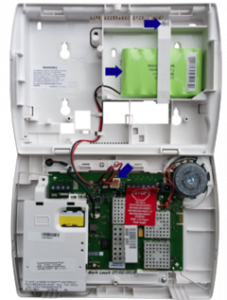
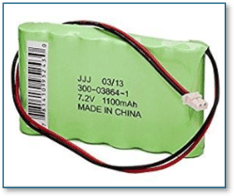
The battery pack is: 300-03864 7.2V, or P/N LYNXRCHKIT-SC or LYNXRCHKIT-SHA
Accessing the Battery Compartment
- Locate the Lynx Plus keypad.
- If mounted on a wall, grasp the keypad and carefully lift it upward to release it from the mounting plate.
- Gently pull the keypad away from the wall.
- If your model includes retaining screws, remove them before separating the keypad from the mounting plate.
- Locate the battery compartment on the back of the keypad.
Replacing the Battery
- Disconnect the existing battery pack from the connector inside the keypad.
- Remove the old battery pack.
- Install the new battery pack in the same location.
- Connect the new battery pack to the battery connector.
- Ensure the connection is secure and that the wiring is not pinched.
Reinstalling the Keypad
- Align the keypad with the mounting plate.
- Slide or snap the keypad back into place.
- Reinstall any mounting screws if applicable.
- Confirm that the keypad powers on normally.
After Battery Replacement
- The system may continue to display a low battery message for several hours while the new battery charges.
- Once fully charged, the low battery trouble condition should clear automatically.
- If the trouble condition remains after 24 hours, verify the battery connection and confirm the correct replacement battery was installed.